
Download WhatsChat – Free Secure Mac Chat App
Overview
WhatsChat – Chat with Friends is a lightweight, free Mac application that belongs to the Internet software category, specifically under Chat & Communication. First introduced to our catalog in 2016, WhatsChat has attracted a modest user base while maintaining a focus on privacy, speed, and a clean user experience. The current version, 1.3, was refreshed on 1 April 2017 and runs natively on macOS X and later releases.
Designed for English‑speaking users, the app delivers a simple interface that mimics the look and feel of popular mobile messengers, yet it is optimized for desktop productivity. Whether you are looking to keep in touch with friends, coordinate with teammates, or simply enjoy a distraction‑free chat window, WhatsChat offers a free, secure, and ad‑free environment. Its modest install size (exact figure not disclosed) ensures that it won’t bloat your system, making it ideal for older Macs or devices with limited storage.
The software is continuously updated to patch security vulnerabilities and to stay compatible with the latest macOS releases, reinforcing its reputation as a trustworthy chat client for everyday communication.
Key Features
- Free and ad‑free: No hidden costs or intrusive advertisements.
- End‑to‑end encryption: Messages are encrypted on the device before they leave your Mac.
- Cross‑platform syncing: Seamlessly sync conversations with WhatsChat mobile versions (iOS/Android) via QR code pairing.
- Rich media support: Send photos, videos, voice notes, and documents up to 100 MB.
- Customizable themes: Light and dark mode, plus accent color options to match your workflow.
- Group chat management: Create, rename, and moderate groups with admin controls.
- Desktop notifications: Real‑time alerts with sound, banner, or badge options.
- Keyboard shortcuts: Quick navigation with Cmd + N (new chat), Cmd + Shift + M (mute), and more.
- Secure file storage: All shared files are encrypted locally and can be deleted remotely.
- Automatic updates: Background update checks keep the app current without manual intervention.
Installation, Usage & Compatibility
Installation steps:
- Visit the official WhatsChat website or the Mac App Store and click the Download button.
- The .dmg file will mount automatically. Drag the WhatsChat icon into your Applications folder.
- Open the application; macOS may warn you about an unidentified developer. Go to System Preferences → Security & Privacy → General and click Open Anyway.
- Sign in with your phone number or email address. Verification is performed via an SMS code or email link.
- Once authenticated, you’ll be prompted to import contacts from your macOS address book or sync with your mobile WhatsChat client.
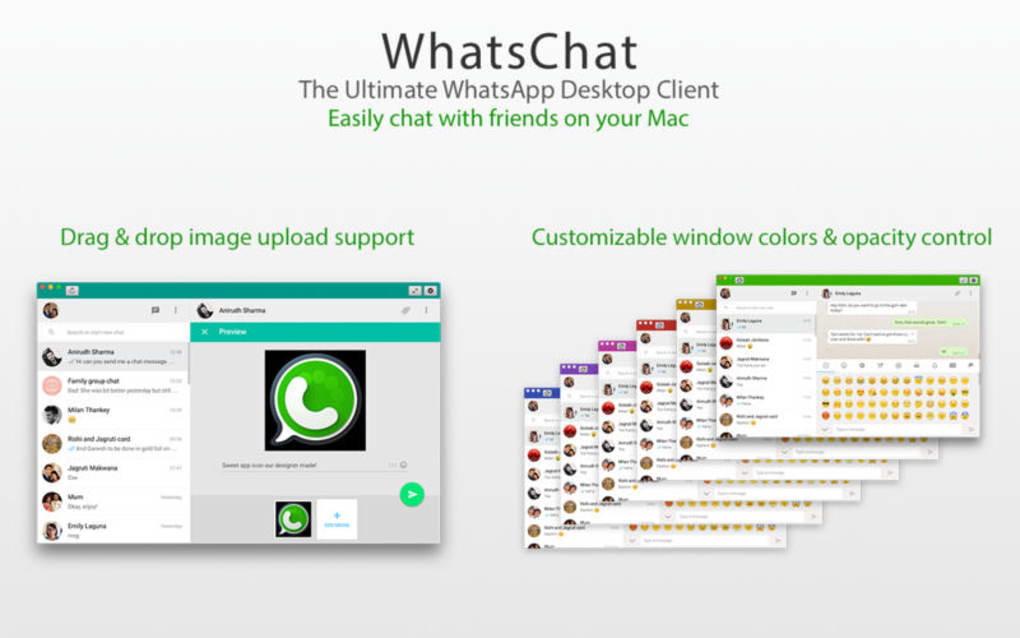
After installation, the interface presents a left‑hand sidebar listing recent chats, a central conversation pane, and a right‑hand details panel for shared media and settings. Starting a new conversation is as simple as clicking the New Chat button or using the Cmd + N shortcut. Group chats can be created by selecting multiple contacts and choosing New Group.
Compatibility: WhatsChat runs on macOS X 10.10 (Yosemite) and later, including macOS 11 (Big Sur), macOS 12 (Monterey), and macOS 13 (Ventura). The app is optimized for both Intel‑based Macs and Apple Silicon (M1/M2) devices, automatically selecting the appropriate binary at launch. System requirements are modest: a minimum of 2 GB RAM, 200 MB free disk space, and an active internet connection for real‑time messaging. Users with older hardware should still experience smooth performance, as the application is built with lightweight Electron components that avoid excessive CPU usage.
For best security practices, enable macOS’s built‑in firewall, keep your operating system updated, and periodically review the app’s permission settings under System Preferences → Security & Privacy → Privacy. WhatsChat respects user privacy and does not collect telemetry beyond essential crash reports, which can be disabled in the preferences pane.
Pros, Cons, FAQ & Conclusion
Pros
- Completely free with no hidden fees.
- End‑to‑end encryption ensures privacy.
- Lightweight and fast on older Macs.
- Rich media support and group chat tools.
- Regular automatic updates keep security current.
Cons
- Limited to macOS; no native Windows or Linux version.
- Feature set is smaller compared to heavyweight competitors like Slack or Microsoft Teams.
- Occasional sync delays when connecting with older mobile devices.
Overall, WhatsChat delivers a solid, secure, and cost‑free chatting experience for Mac users who value simplicity and privacy.
Frequently Asked Questions
Is WhatsChat really free?
Yes, WhatsChat is completely free to download and use. There are no subscription fees or in‑app purchases.
How secure is the messaging?
All messages are encrypted end‑to‑end using industry‑standard protocols, meaning only you and the recipient can read the content.
Can I use WhatsChat on Windows?
Currently, WhatsChat is only available for macOS. A Windows version is under consideration but has not been released.
What file types can I send?
You can share images (JPG, PNG, GIF), videos (MP4, MOV), audio files (MP3, AAC), and documents (PDF, DOCX, XLSX) up to 100 MB per file.
How do I back up my chat history?
WhatsChat stores chats locally in an encrypted database. You can back up this file manually or enable iCloud sync in the app’s settings for automatic backups.
Conclusion & Call to Action
If you are a Mac user looking for a secure, free, and uncomplicated chat solution, WhatsChat – Chat with Friends ticks all the essential boxes. Its lightweight design, strong encryption, and cross‑device syncing make it a practical alternative to larger, often paid, communication suites. While the lack of a Windows client and a more expansive feature set might deter power users, the core experience remains solid for everyday messaging. Ready to try it out? Download WhatsChat now and start chatting with friends and colleagues securely on your Mac today.







